
PoolHealth for pool and hot tub owners
Know whatyour pool needstoday.
Take a photometer reading. PoolHealth tells you what to add, how much and why, for your pool or hot tub. No guessing, no phone calls.
From €30 a month · 14-day free trial · Up to 2 pools or hot tubs

The usual way
Strips tell you too little.Phone calls cost too much.
Test strips
They give approximate readings and leave out values that decide how your water behaves. You end up guessing the rest.
Asking a specialist
Every “what should I do now?” becomes a phone call, and sooner or later an invoice.
Asking AI
A general chatbot doesn’t know your readings or your pool’s history. Its advice fits a pool or hot tub with a different overall picture, not yours.
PoolHealth replaces the guessing, not the professional.
When it really is more than you can handle, you can find a specialist inside the app.
How it works
A reading in.A plan out.
- 1
Measure with a photometer and a TDS meter
Strips can’t measure everything. A photometer and a TDS meter give you the numbers a balanced pool is built on.
- 2
Log the visit
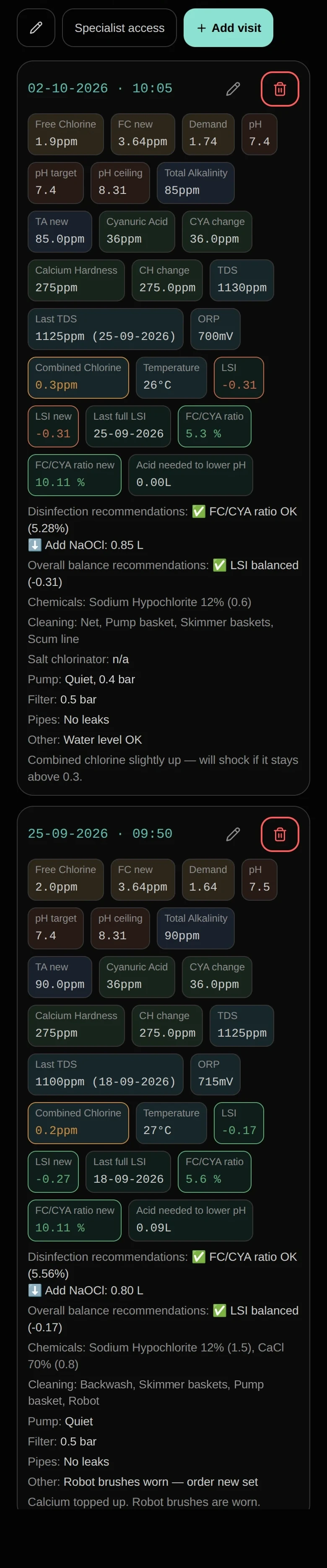
Enter your readings in a minute. Every visit is saved, so the history of your pool or hot tub is always at hand.
- 3
Follow the plan
Improved LSI, disinfection efficiency and day-to-day recommendations: what to add, how much and why.
Why you can trust the numbers
Built on practice,refined for years.
Everything in PoolHealth is something we use on real pools and hot tubs. We built the system from our own experience, and we have been improving the formulas for years. We still are.
Why we never hand you one magic number
Take lowering pH with acid. There is no single correct amount. It depends on whether the pool is indoor or outdoor, on total alkalinity (TA), on cyanuric acid (CYA) and on how much it is used. A number that ignores those factors is a guess.
So PoolHealth works in three ways
Analyse
Enter your readings and PoolHealth analyses the water: improved LSI, and what is out of balance in your pool or hot tub.
Set a target
Choose the free chlorine (FC) you want. PoolHealth works out what it takes to get there from your own readings.
Get a recommendation
Get a dose for today. Or pick the amount of a chemical yourself and see how total alkalinity (TA), cyanuric acid (CYA) and the other values shift.
What you get
Everything an owner needs.
Up to 2 pools or hot tubs
Any combination in one account, each with its equipment, schedule and a map link.
Improved LSI and day-to-day recommendations
Not just a score. A plan for today, based on the latest readings. The calculator and the recommendations are included, with no extra charge.
Disinfection efficiency
Based on your type of pool and the chemicals you use, checked at every visit.
Visit log and water charts
Visit history, water readings and equipment status with photos, all in one place, with charts of how your water behaves over a season. Works with a weak signal: readings wait and sync later.
Chemical usage
Counted and compared, so you know what your pool really consumes.
Works offline
No signal at the pool? The app still works and does all the calculations. Your data is uploaded to the server once you are back online.
Your data
Download all your data, tables and photos, whenever you want.
Find a specialist
When it is more than you can handle, find one inside the app. You can give a specialist access to your pool, or hand its maintenance over to them.
Pricing
One plan.Everything above.
Less than a single call-out. Cheaper still when you pay for the year.
Billed yearly (€360). You save €72.
- Up to 2 pools or hot tubs
- Improved LSI, calculator and dosing recommendations, all included
- Visit log, water charts, equipment photos, chemical usage and disinfection efficiency
- Find a specialist inside the app
Start with a 14-day free trial.
Looking after other people’s pools? That is the Professional plan.
Questions
Before you start.
Do I need a photometer and a TDS meter?
We recommend both. Strips are approximate and don’t measure every value PoolHealth uses, and the app is built around photometer readings. TDS is one of the values the LSI uses, and a TDS meter measures it.
Which values do I enter?
It depends on your situation. The basics are pH, free chlorine, total alkalinity (TA), calcium hardness (CH), cyanuric acid (CYA), TDS and water temperature. Depending on your country and on the problem you are solving, you can also measure and track other parameters you need.
How many pools and hot tubs can I add?
Up to two on the Owner plan, in any combination: two pools, two hot tubs, or one of each. Extra pools and add-ons are not sold for Owner. If you look after more, that is the Professional plan.
Can I hand my pool over to a specialist?
Yes. You can give a specialist access to a pool, or hand its maintenance over to them. You can also pass the whole account to a specialist with their client code. Cancel your subscription first.
Can I move from a free Client account to Owner?
Yes. You send a request and your specialist confirms it.
Is there a free trial?
Yes. Every paid plan starts with a 14-day free trial.
How is this different from asking an AI chatbot?
A chatbot gives general advice. PoolHealth works from your own readings and the history of your water, and calculates for your pool.
What happens if I don’t subscribe after the trial?
Your account becomes read-only. You can still see your data, but you can’t add new records.
Can I download my data?
Yes. You can download all your data as an archive with tables and photos.
My pool specialist already uses PoolHealth. Do I need the Owner plan?
Not necessarily. Your specialist can give you a free Client account: your pools, visits, readings, photos and reports, and a chat with your specialist. The Owner plan is for people who look after their own pool or hot tub.
Does it replace a pool professional?
No. PoolHealth is a tool, and what you get from a tool depends on who uses it and how. It shows you what is happening in the water and what to do about it. The decision stays with you. When the job is bigger than that, such as repairs or equipment problems, you can find a specialist inside the app who works within the system.
Which languages are available?
English, German, French, Spanish, Greek and Russian.